SVG vs PNG: Which Image Format Should You Choose in 2026?
SVG vs PNG: Which image format is better for your website in 2026? Discover the complete comparison including file size, quality, scalability, SEO benefits, and real use cases. Learn exactly when to use SVG and when to choose PNG for faster loading and sharper visuals.
Picking the right image format can make your website feel faster, look sharper, and rank better. If you have ever wondered whether to save your logo as SVG or PNG, you are not alone. Many designers and developers face this choice every day.
In this friendly guide, we will walk through SVG versus PNG in simple terms. We will cover their differences, strengths, weaknesses, and exactly when to use each one. Let's make this easy and practical for you.
What is SVG?
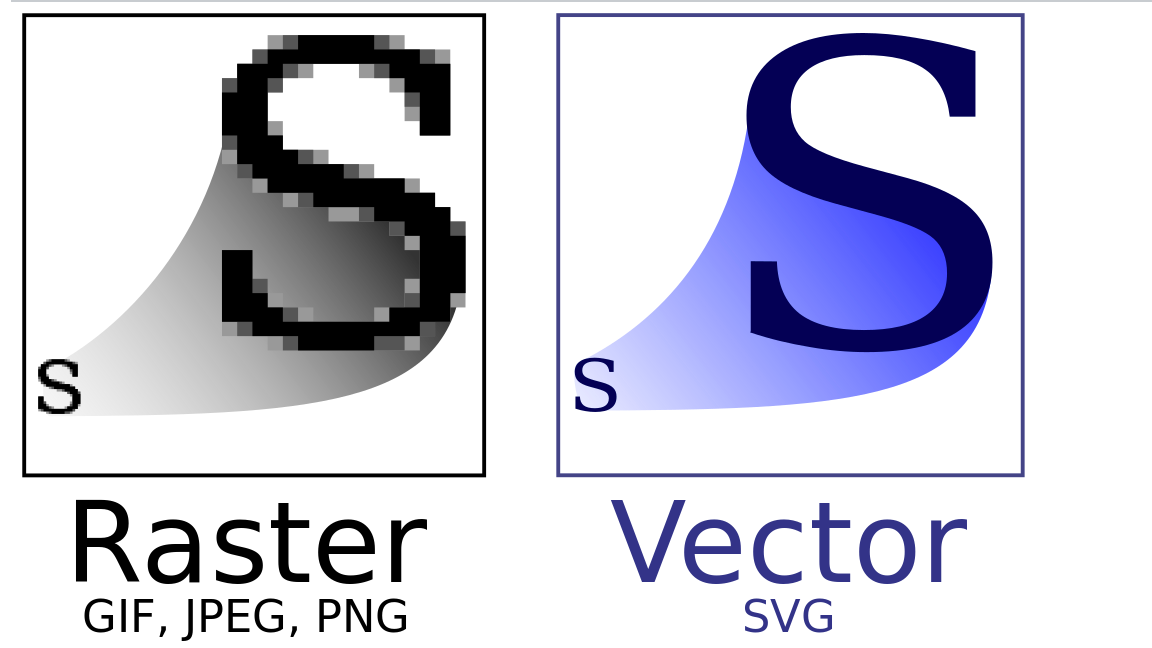
SVG stands for Scalable Vector Graphics. Instead of saving an image as thousands of tiny dots (pixels), SVG saves instructions like "draw a circle here" or "make a straight line from point A to B."
This makes SVG files resolution-independent. They stay perfectly crisp no matter how much you zoom in or what screen size you use.

What is PNG?
PNG means Portable Network Graphics. It is a classic raster format that saves every single pixel of an image. PNGs handle transparency beautifully and keep full quality without any loss when compressed.
They work great for photos and detailed pictures, but they can get blurry if you enlarge them too much.
SVG vs PNG: Side-by-Side Comparison
Here is a clear breakdown to help you see the differences at a glance:

Look at the apple example above. The SVG version stays clean and smooth when zoomed, while the PNG version turns pixelated. This difference matters a lot on modern high-resolution screens.
The Good and Not-So-Good Sides
Why people love SVG:
- It looks crystal clear on phones, tablets, laptops, and even huge monitors
- File sizes stay small for icons and logos
- You can change colors, animate, or resize it with simple code
- Text inside SVGs can be selected and read by search engines
Challenges with SVG:
- Not great for real-life photos (the file can become huge and slow)
- Very complex designs may take longer to load
- You need some design tools or code knowledge to create them
Why people love PNG:
- Perfect for photographs and detailed images
- Handles soft shadows and transparency really well
- Super easy to create in tools like Photoshop or Canva
- Works everywhere without issues
Challenges with PNG:
- Files get bigger as image detail increases
- Loses sharpness when you scale it up
- Text inside cannot be read by search engines
When Should You Use SVG?
Go with SVG for these situations:
- Website icons and navigation buttons
- Company logos that appear in headers and footers
- Simple illustrations and line drawings
- Charts, diagrams, and infographics
- Anything that needs to look perfect on every device

When Should You Use PNG?
Choose PNG when you have:
- Product photos for your online store
- Team member portraits or lifestyle images
- Detailed screenshots for tutorials
- Complex artwork with lots of colors and textures
- Images where you need soft, natural transparency
Real-World File Size Example
A clean company logo might be:
- SVG: only 3 to 10 KB
- PNG (at high resolution): 40 to 150 KB
For a beautiful product photo, PNG wins easily because SVG would struggle to represent all those details.
Helpful tip: Always optimize your files. Tools like SVGOMG for SVGs and TinyPNG for PNGs can shrink sizes dramatically without losing quality.
How This Affects Your Website Speed and SEO
Search engines love fast websites. Using SVG for icons and logos keeps your page weight low, which helps with loading times and user experience. Plus, any text inside your SVGs can be discovered by Google, giving you a small but nice SEO boost.
Other Modern Options Worth Knowing
- WebP : Often smaller than PNG with transparency support
- AVIF : Even better compression for photos (great for 2026)
- Inline SVG : For super important icons to reduce extra file requests
Final Thoughts: SVG or PNG?
There is no single best format. It all comes down to what you are trying to show.
Use SVG for logos, icons, and anything that needs to stay sharp and lightweight.
Use PNG for photos, detailed images, and complex visuals.
The smartest approach in 2026 is to combine both. Use SVG wherever it makes sense for speed and clarity, and PNG (or WebP) for your rich content images.